Over my 12+ years of engineering enterprise web applications and consulting for scaling B2B organizations, I have seen hundreds of founders and CTOs reach a critical inflection point: they have hit the absolute functional, performance, and security ceilings of off-the-shelf templates and commercial website builders.
Whether you are struggling with sluggish Core Web Vitals on a bloated legacy CMS, battling fragile third-party plugin integrations that break during every update, or weighing web development outsourcing options for your next build, you are facing the inevitable question: What is custom web development, and when does it make financial sense for your enterprise?
In this comprehensive architectural guide, I break down what custom web development actually entails from an engineering perspective, how decoupled architectures compare against monolithic page builders, the real total cost of ownership (TCO), and the exact decision framework I use to determine whether a custom build is the right strategic move for your business.
Quick Definition: What is Custom Web Development?
Custom web development is the practice of designing, engineering, and deploying web applications and digital platforms from the ground up to match an organization's exact business logic, workflows, security protocols, and performance requirements—without relying on pre-packaged monolithic templates or restrictive builder sandboxes.
Unlike generic template-driven websites (where your business model is forced into the constraints of an existing theme), custom development starts with your operational requirements. The front-end user experience, back-end API integrations, database schemas, and edge caching layers are purposely architected to solve specific business bottlenecks.
Custom Web Development vs. Off-the-Shelf Builders: The Technical Comparison
To understand why scaling companies migrate to bespoke solutions, let's examine the architectural differences across core enterprise vectors:
| Evaluation Vector | Commercial Page Builders (Wix, Elementor, Squarespace) | Custom Enterprise Stack (Next.js, Sanity, Edge API) |
|---|---|---|
| Page Load & TTFB | 1.8s – 4.5s (Heavy DOM, render-blocking scripts) | Sub-300ms (Static generation, Edge CDN caching) |
| Core Web Vitals | Frequently fails LCP and INP due to script bloat | Near-perfect 95-100 scores natively |
| Data Ownership | Locked into vendor infrastructure and proprietary formats | 100% owned codebase, portable headless content |
| Third-Party Integrations | Fragile plugins, restrictive API rate limits, Zapier hacks | Native webhook handlers, bespoke middleware, direct ERP/CRM sync |
| Security Attack Surface | High (Vulnerable plugin ecosystems, exposed wp-login) | Minimal (Decoupled static frontends, isolated serverless APIs) |
| Scalability Ceiling | Hits concurrency limits during high traffic spikes | Virtually infinite scale via globally distributed edge networks |
The Core Architecture of Modern Custom Web Development
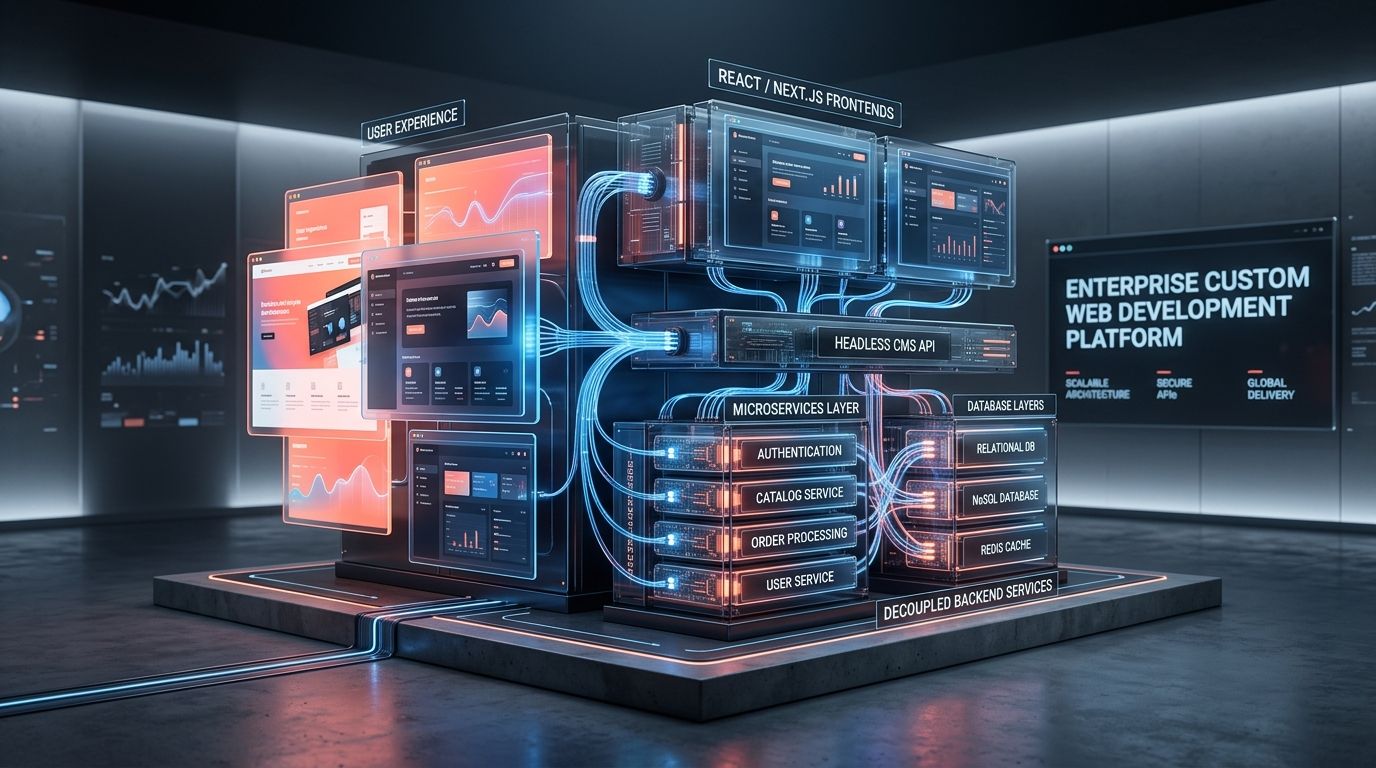
In modern software engineering, 'custom web development' no longer means writing raw HTML files from scratch or building fragile PHP monoliths. Today, enterprise web architecture relies on the decoupled, composable model (often referred to as the modern Jamstack or Headless ecosystem).
1. The Presentation Layer (Modern React & Next.js)
The user-facing interface is built using component-driven frameworks like Next.js 15 (React 19). As I explored in my breakdown of React vs Next.js for SaaS applications, leveraging React Server Components (RSCs) allows the server to pre-render critical HTML ahead of time, shipping virtually zero unnecessary JavaScript to the browser. This eliminates the sluggish Time to Interactive (TTI) common in legacy builders.
2. The Content Layer (Headless CMS)
Instead of coupling database tables directly to page layout templates, content is managed in a specialized Headless CMS such as Sanity. As detailed in our guide on Headless CMS SEO & Architecture, content is structured as pure, portable data (JSON) accessible via secure GraphQL or GROQ APIs. Your marketing team gets a fluid, customized editorial dashboard, while developers retain full control over how that data is rendered.
3. The Integration & Middleware Layer
Enterprise operations run on interconnected systems: Salesforce, HubSpot, Stripe, NetSuite, custom LLM pipelines, and internal ERPs. Custom development allows us to write lightweight serverless middleware that validates, sanitizes, and routes data seamlessly between your web application and your back-office infrastructure in milliseconds:
// Example: Next.js 15 Server Action integrating custom ERP quoting logic
'use server';

import { z } from 'zod';
import { secureErpClient } from '@/lib/erp-client';

const QuoteSchema = z.object({
  companyId: z.string().uuid(),
  tier: z.enum(['standard', 'enterprise']),
  seatCount: z.number().min(5),
});

export async function generateEnterpriseQuote(formData: FormData) {
  const parsed = QuoteSchema.safeParse({
    companyId: formData.get('companyId'),
    tier: formData.get('tier'),
    seatCount: Number(formData.get('seatCount')),
  });

  if (!parsed.success) {
    return { success: false, error: 'Invalid enterprise parameters.' };
  }

  // Real-time calculation against internal ERP microservice
  const pricingData = await secureErpClient.calculateCustomTier(parsed.data);
  return { success: true, data: pricingData };
}
4. The Global Edge Delivery Layer
Rather than hosting everything on a single overloaded virtual private server (VPS) in one geographic region, custom applications are compiled into optimized edge bundles and deployed globally via networks like Cloudflare Pages or Vercel. Static assets are served from cache nodes within 20 milliseconds of any user worldwide.
5 Critical Signs Your Business Needs Custom Web Development
Not every business requires a bespoke web application on Day 1. If you are a solo consultant testing product-market fit, an off-the-shelf builder is sufficient. However, if you exhibit any of the following 5 symptoms, staying on a commercial builder is actively costing you revenue:
- You Have Hit a Hard Integration Ceiling: You need your web portal to synchronize bi-directionally with your CRM, inventory management, or customer billing database, and existing off-the-shelf plugins keep corrupting data or timing out.
- Your Core Web Vitals are Tanking Search Rankings: You have spent thousands on performance plugins, caching tools, and CDN add-ons, but the inherent DOM bloat of your theme keeps your mobile PageSpeed score in the red (below 50).
- Security & Compliance Requirements: Your company handles sensitive medical records (HIPAA), financial transactions (SOC 2 / PCI-DSS), or strict data privacy requirements (GDPR) that cannot be trusted to third-party WordPress plugins with unverified update cycles.
- High-Volume Transactional Logic: You are building dynamic calculators, multi-step configurators, or customized client dashboards where user sessions require instant real-time data processing without page reloads.
- Developer Velocity & Maintenance Nightmares: Your engineering team spends 70% of their time fixing broken theme updates, patching PHP vulnerabilities, and maintaining fragile workarounds instead of shipping revenue-generating features.
The Financial Reality: Total Cost of Ownership (TCO) Breakdown
When executives evaluate custom development, they often balk at the initial capital expenditure compared to a $50 WordPress theme. However, an honest financial analysis must account for the 3-year Total Cost of Ownership (TCO). You can also run simulations with our free AI Proposal & Scope Generator to model operational deliverables:
| Cost Component | Monolithic Builder (WordPress/Plugins) | Custom Next.js & Headless Architecture |
|---|---|---|
| Initial Build Cost | $3,000 – $10,000 | $15,000 – $60,000+ |
| Annual Plugin / App Licenses | $1,500 – $5,000/year | $0 – $600/year (Native code, open-source) |
| Emergency Maintenance & Patching | $4,000 – $12,000/year (Plugin breakage) | < $1,000/year (Type-safe, immutable deploys) |
| Hosting & Bandwidth at Scale | $150 – $600/month (Heavy server load) | $20 – $100/month (Serverless Edge execution) |
| Conversion Loss from Slow Speed | 1% sales loss per 100ms latency (Amazon benchmark) | Near zero latency penalty |
| Estimated 3-Year Total Cost | $35,000 – $65,000 + lost conversions | $25,000 – $75,000 + higher conversion rate |
The 5-Phase Custom Web Development Process
When I deliver a custom web application through my Custom Website Development Services, I follow a disciplined 5-phase engineering roadmap designed to eliminate scope creep and ensure on-time delivery:
- Phase 1: Technical Scoping & Architecture Design — Mapping user stories, database schemas, third-party API contracts, and selecting the optimal tech stack.
- Phase 2: UI/UX Prototyping & Design Systems — Building reusable, accessible component libraries in Figma tailored to your exact brand guidelines.
- Phase 3: Front-End & Headless CMS Engineering — Developing pixel-perfect, server-rendered components in Next.js 15 and configuring structured schemas in Sanity.
- Phase 4: API Integration & Automated QA Testing — Connecting CRM/ERP backends, running end-to-end Cypress/Playwright test suites, and conducting penetration tests.
- Phase 5: Edge Deployment & Zero-Downtime Migration — Setting up CI/CD pipelines, configuring Cloudflare Edge caching, executing 301 redirect mappings, and passing all Google Core Web Vitals checks.
Conclusion: Taking Control of Your Digital Infrastructure
Custom web development is not merely an aesthetic upgrade—it is an investment in enterprise agility, data ownership, and technical defensibility. When your platform is engineered specifically for your business, your speed becomes an unfair advantage, your conversion rates increase, and your engineering team can build features without fighting platform limitations.
If you are ready to evaluate a migration from a legacy monolithic CMS to a high-performance Next.js and Sanity architecture, check out my Web Development Outsourcing Strategy Guide or book a direct technical consultation to review your project scope.